
Pages, in order
Scan multiple pages, organize them in folders and find them again by title, date or supported recognized text. Add, rotate, reorder or remove pages later.
Scan documents to PDF on Android, add your signature and put a recipient watermark on the copy you share. Read or create QR codes in the same app. Twenty free scanned pages a day, with document processing on your phone.
Android 10+ · Google Play services · 22 languages
| Free use | 20 scanned pages per local day. Imported PDFs do not count. Compression, sharing and exports stay available. |
|---|---|
| Premium | USD $0.99/week, $2.99/month or $19.99/year. Removes the scan limit and upgrade reminders. |
| Account & ads | No 1Scanner account. No advertisements. |
| Processing | Documents and OCR on-device. Google SDK technical telemetry is explained in the Android privacy policy. |
| Availability | Available on Google Play. Android 10+, Google Play services, 22 interface languages. |
Product information updated October 5, 2026, for 1.0.2g. Google Play · Android privacy policy.
Scan a receipt, a signed letter or a stack of pages with Google’s document scanner. Adjust the crop, rotation and filters, then save the finished document straight into 1Scanner.
Scan multiple pages, organize them in folders and find them again by title, date or supported recognized text. Add, rotate, reorder or remove pages later.
Put both sides of an ID on one A4 or Letter sheet at standard card size. The Passport tool places the photo page on one sheet at standard passport size.
Import an existing PDF or turn selected photos into pages. Bring PDFs and images into 1Scanner from other Android apps.
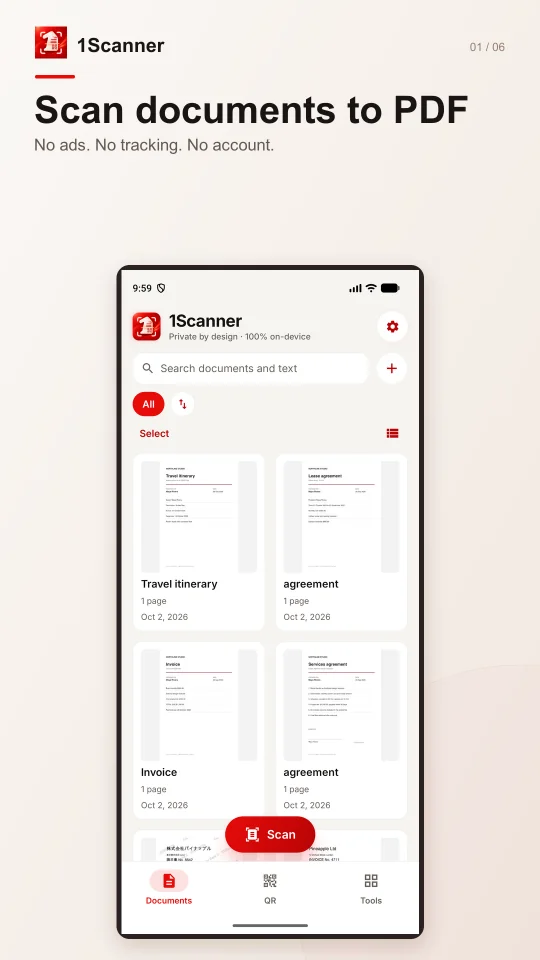
Your pages, recognized text and saved signatures live in the app’s private storage. There is no 1Scanner account or document-upload server. You choose when to share or save copies elsewhere.
Android scanning uses Google’s ML Kit and Play services. Google’s SDKs collect technical diagnostics and usage information; this is separate from uploading your documents. Read the complete Android privacy policy for those details and your storage choices.
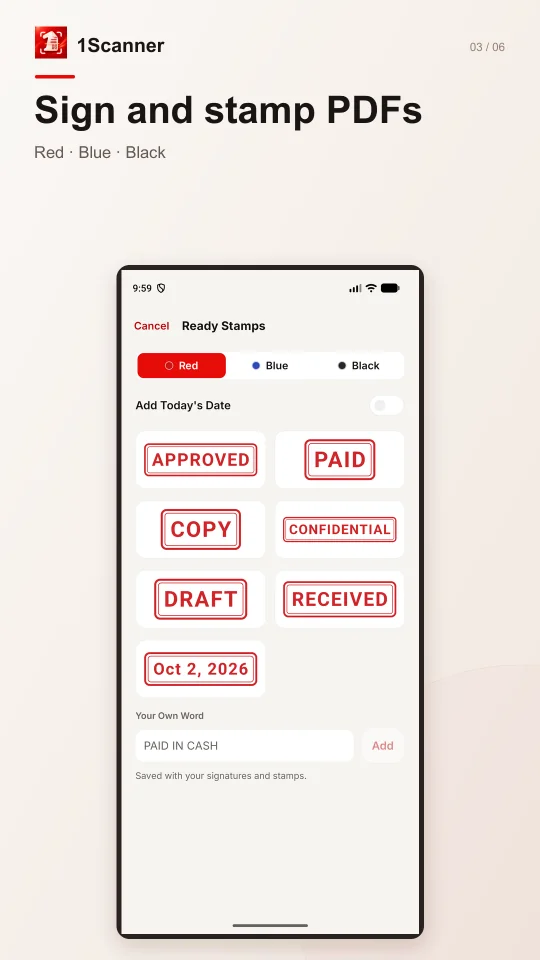
Save reusable signatures and stamps with the paper background removed, or choose a ready stamp such as PAID or COPY. Add text, place and resize each item, or apply it to every page.
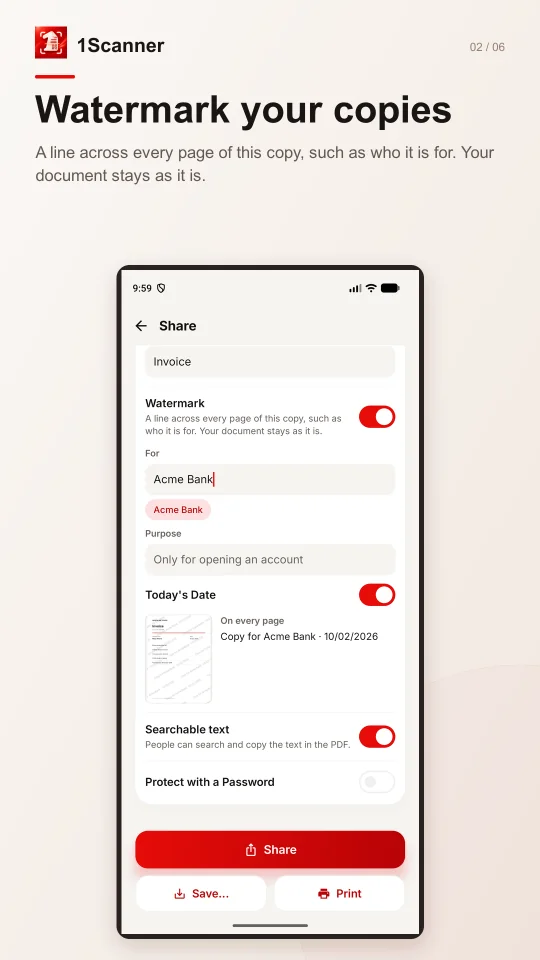
Add a recipient and purpose, and optionally include today’s date: “Copy for Bank X · account application”. The mark becomes part of every exported page; your original stays clean. This tool is free.
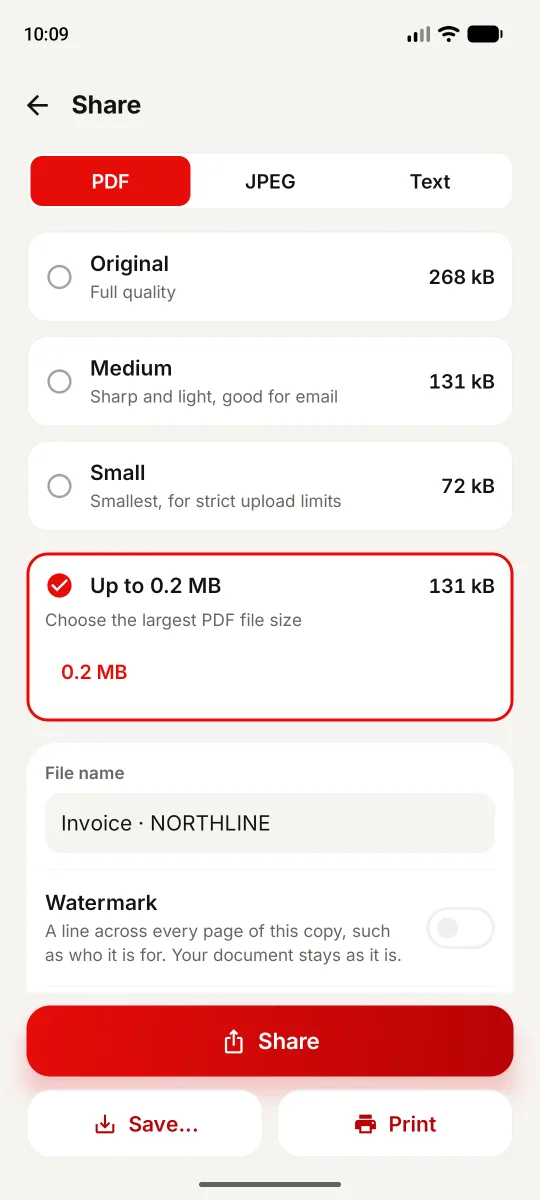
See the measured size before sending a PDF or JPEG. JPEGs and scanned or watermarked PDFs offer Original, Medium and Small. Scanned or image-page PDFs also offer a size limit; use Tools → Compress for an existing imported PDF.
Choose Latin, Chinese, Japanese, Korean or Devanagari in Settings. Copy supported recognized text, search it and export searchable PDFs. The script choice is separate from the app’s interface language.
Compress, merge and split PDFs. Protect exported PDFs with a password. Keep the original and make the file you need.
Read a code with the camera or from a photo. Review the full link before opening it and keep useful codes in your history.
Create QR codes and Code 128 barcodes, then save or share them. Use the supported actions for Wi-Fi, contacts and other code content.
Choose a PDF size limit from 0.2 to 20 MB and check the actual file size before sending. For 500 KB, select 0.5 MB. Compression makes a copy and leaves your original unchanged.
Some PDFs cannot meet a tight limit without making the pages harder to read. 1Scanner shows a warning and the smallest measured size, which may still exceed the limit. Open the copy and check small text, stamps and signatures.
Choose to lock 1Scanner with your phone’s supported fingerprint, face or screen lock. Android handles authentication; 1Scanner does not receive biometric templates.
Keep the library in the app and optionally save PDF copies to a folder you choose. Library data can move through device-to-device transfer; it is not included in Google cloud backup.
Twenty scanned pages per local day are free. A scan already started can finish; imported PDFs do not count. Compression, sharing, printing, text and QR scanning remain available. Every second eligible scan or document-making tool shows a closable upgrade reminder. Premium removes the scan limit and reminders.
$0.99 / week
For the paperwork you need to finish now.
$2.99 / month
For regular scanning and document work.
$19.99 / year
For a full year without the daily scanning limit.
Base prices in US dollars, excluding VAT and other local taxes. No free trials or introductory offers. Subscriptions renew unless cancelled in Google Play. Terms of Use.
Yes. Add the recipient and purpose when sharing, saving or printing, and optionally include today’s date. The watermark is burned into the copy’s pages, while your original stays unchanged. It identifies the intended use; it does not guarantee acceptance by the recipient or prevent misuse.
Document processing, text recognition and PDF tools run on your device. Camera scanning needs Google Play services and may require an initial scanner download. Buying or restoring Premium, opening a web link and sending files through an online service need a connection.
You can scan 20 pages per local day for free. Imported PDFs do not count. The limit is checked before a new scan starts; a scan already started can finish. Sharing, exporting, printing, reading text and QR scanning remain available. Premium removes the daily limit and upgrade reminders.
Yes. In Tools → Compress, choose your document and set PDF size limit to 1 MB or 0.5 MB. For scanned or image-page documents you can also choose a target when sharing a PDF. Check the measured size and readability: a difficult PDF can remain above the limit, with a warning. The original stays unchanged. See the step-by-step Android guide.
Yes. Compression is free and the daily limit applies to scanned pages, not PDFs compressed. Saving a smaller copy can show a dismissible upgrade reminder on every second eligible action. Sharing and exporting remain available. Premium removes the reminders and scan limit.
Yes. Save a signature or stamp once, then place it on a scanned document or imported PDF. Add a name, date or other text, move and resize it, and export the result. These are visual signatures and stamps, not a certified electronic-signature service.
1Scanner has no document-upload server or user account. Scanning and text recognition run on-device. Google’s ML Kit and Play services process technical diagnostics and usage data as described in the Android privacy policy. Sharing, exports and links go to the destination you choose.
Android 10 or later and Google Play services are required. Google’s document scanner needs at least 1.7 GB of device RAM. Phones without Google Play services cannot use the camera document scanner or code scanner.
The app interface has 22 languages. Text recognition separately supports Latin, Chinese, Japanese, Korean and Devanagari scripts; choose your document script in Settings. Cyrillic, Arabic, Thai, Greek and Hebrew are not recognized. Changing the interface language does not add OCR support for that script.
Documents, signatures, stamps and QR history can move with Android’s device-to-device transfer, but are excluded from Google cloud backup. Android may offer Keep app data when uninstalling. Export files or enable PDF copies to a chosen folder before uninstalling if you want independent copies.
Android uses Google’s scanning screens, its supported OCR scripts, Google Play billing and Android storage and backup. Its signing tools include signatures, stamps and typed text. The iPhone and iPad version has its own page and privacy policy.