
Compress a PDF on Android to 1 MB or 500 KB
To reduce a PDF for an upload limit, open Tools → Compress in 1Scanner, choose your document and set PDF size limit to 1 MB or 0.5 MB for 500 KB. Wait for the measured result, save a smaller copy and check that it is readable. The selected limit is a ceiling; some documents cannot reach it.
| Cost | Compression and sharing are free. A reminder when saving a copy can be dismissed. |
|---|---|
| Free scanning | 20 scanned pages per local day. Imported PDFs and compression do not use this allowance. |
| Processing | On your phone, without a 1Scanner account or document-upload server. |
| Size choices | 14 PDF limits from 0.2 to 20 MB. 0.5 MB means 500,000 bytes. |
| Original | Unchanged. Compression creates a separate copy. |
Compress a received PDF on Android
- If the PDF is not in your library, use Tools → Import Files and select it.
- Open Tools → Compress and choose the document.
- Select the Up to… row. Tap its red size value, choose 1 MB or 0.5 MB in PDF size limit, then tap Done.
- Wait for the actual file size. Read any warning before continuing.
- Tap Save Smaller Copy. Open the copy, inspect its pages, then Share it.
The save button is available only when the measured result is smaller than Original. An imported PDF does not always offer a target in its ordinary Share screen; use Compress for this workflow.
Choose a size while sharing an Android scan
For a scanned document or one made from image pages, open Share → PDF. Select Up to…, tap the red size value, choose a limit in the slider and confirm with Done. Wait for measurement, then use Share to send it through another app, or Save… to choose a folder. JPEG and text exports have no target-size option.
If you add a watermark or password, check the resulting measured PDF again. When sharing several documents, the limit applies to each PDF separately, not their combined size.
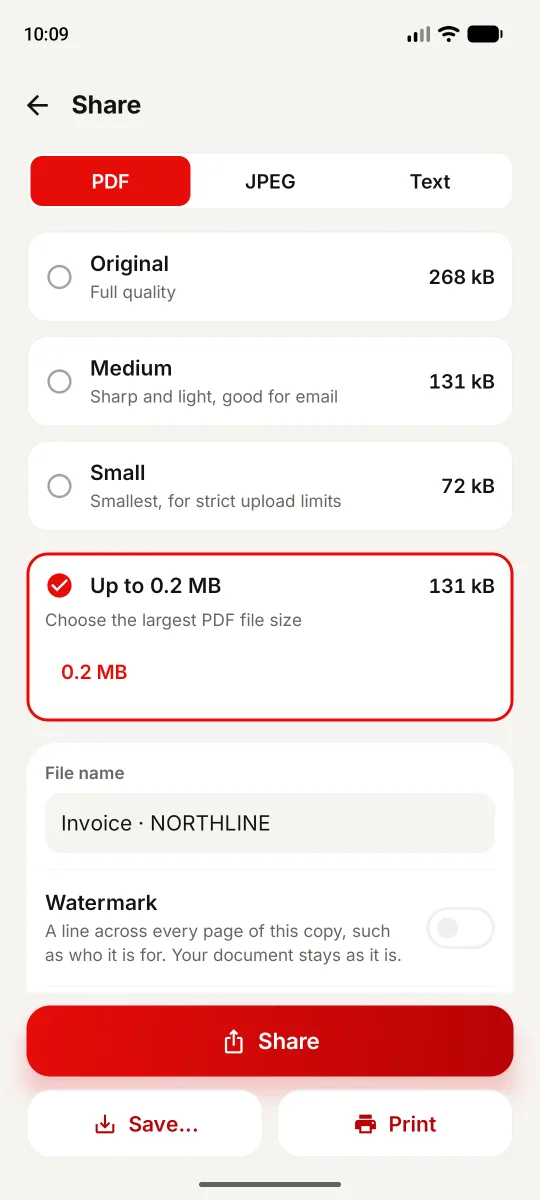
Check the Android PDF before uploading
Open the saved file and zoom into small numbers, fine print, stamps and signatures. Lower image resolution or quality may make a scan smaller but harder to read. Searchable text is retained where available; compression does not add recognition for unsupported scripts.
Follow the receiving website’s rule and the measured output, rather than the target label alone. A “500 KB” site may apply a different boundary or require a file strictly below it.
When the PDF stays above 1 MB or 500 KB
1Scanner warns when it cannot reach the selected limit without making pages harder to read. The smallest measured file can still be too large. Sharing may remain possible, but that does not mean the receiving site will accept it.
For scans, retake unclear pages with good lighting or omit unnecessary pages from a separate copy. Use Split only if the recipient accepts multiple PDFs. Otherwise, keep a readable file and ask which alternative submission method is allowed. Text-heavy imported PDFs may offer little reduction because preserving their text can limit rebuilding.
On-device compression or an online PDF tool?
An online compressor can be convenient without installing an app. Check where it processes files: PDF24’s online tool, for example, says it uses servers. That is a different document-content boundary from 1Scanner’s on-device compression.
Google’s Android SDKs separately collect technical diagnostics, as explained in our Android privacy policy. Sharing to a cloud destination is your choice. Do not assume compression preserves cryptographic signatures, editable forms or every interactive PDF feature: filled forms are flattened. Keep the original.
Android PDF compression questions
How do I compress a PDF to 500 KB on Android?
Choose 0.5 MB in Tools → Compress, check the measured result and save a smaller copy if available. Inspect readability. A difficult PDF can remain above the limit.
Can I compress PDFs offline?
Compression runs on your phone. Camera scanning can need an initial Google scanner download; sending through an online destination needs a connection.
Does the 20-page limit apply to compression?
No. It applies to scanned pages per local day. Imported PDFs do not count. Compression and sharing are free; Premium removes reminders and the scan limit.
Will compression preserve every PDF feature?
No. Quality can decrease, and filled forms are flattened. Keep originals with cryptographic signatures or editable fields and check the exported copy.
Try the released Android workflow.
See all 1Scanner Android features
Product facts: the Google Play listing and release notes and Android product page. Updated October 5, 2026.